Early access

Enosis MRP:Every job, from enquiry to invoice

Quoting and production software for South African job shops. Price every job from your own rates, get it accepted and paid online, and follow every part across the shop floor — one system for the office and the floor.

  • Rand & 15% VAT
  • EFT & card payments
  • Xero & QuickBooks
  • Runs in the browser
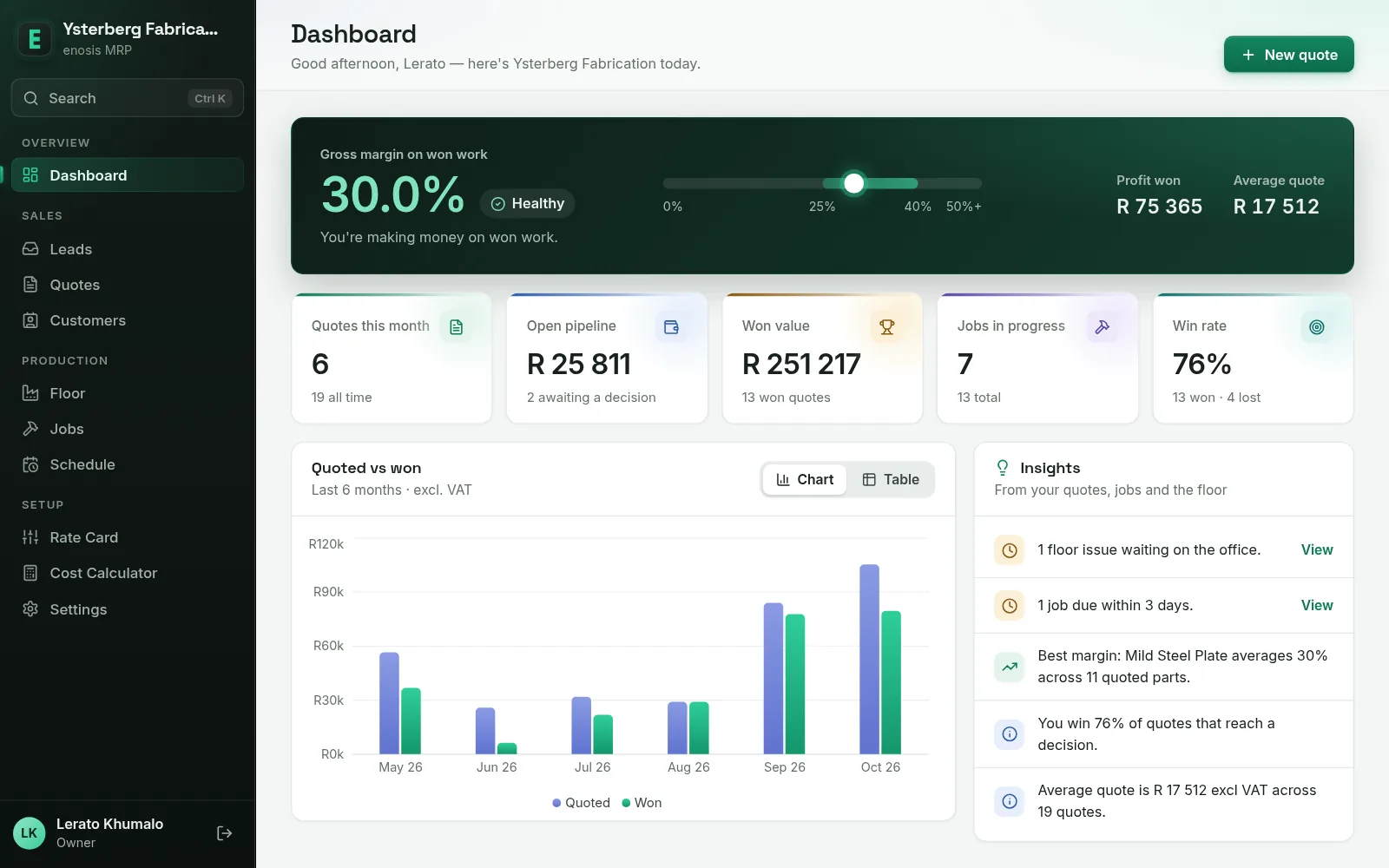
The Enosis MRP dashboard for a demo shop: gross margin on won work, open pipeline, won value, jobs in progress, win rate, a quoted-versus-won chart and a list of insights.

Real product, demo data for a fictional shop.

Everything between the enquiry and the invoice

Built around how a make-to-order shop works: a quote becomes a job, the job moves through the shop step by step, and the real numbers come back to the office.

Quotes priced from your own numbers

Build a quote part by part. Material is weighed from area, thickness and density; cutting time comes from cut length and pierces; your machine and labour rates, buy-outs and outsourced work are added on. Margin, profit and VAT update as you go.

  • Import DXF files for cut length and pierce count
  • Let AI read the parts list off a PDF drawing — you confirm each material
  • Start from South African benchmark rates, or work out a charge-out rate with the cost calculator
  • See when the job could be ready, given the work already booked
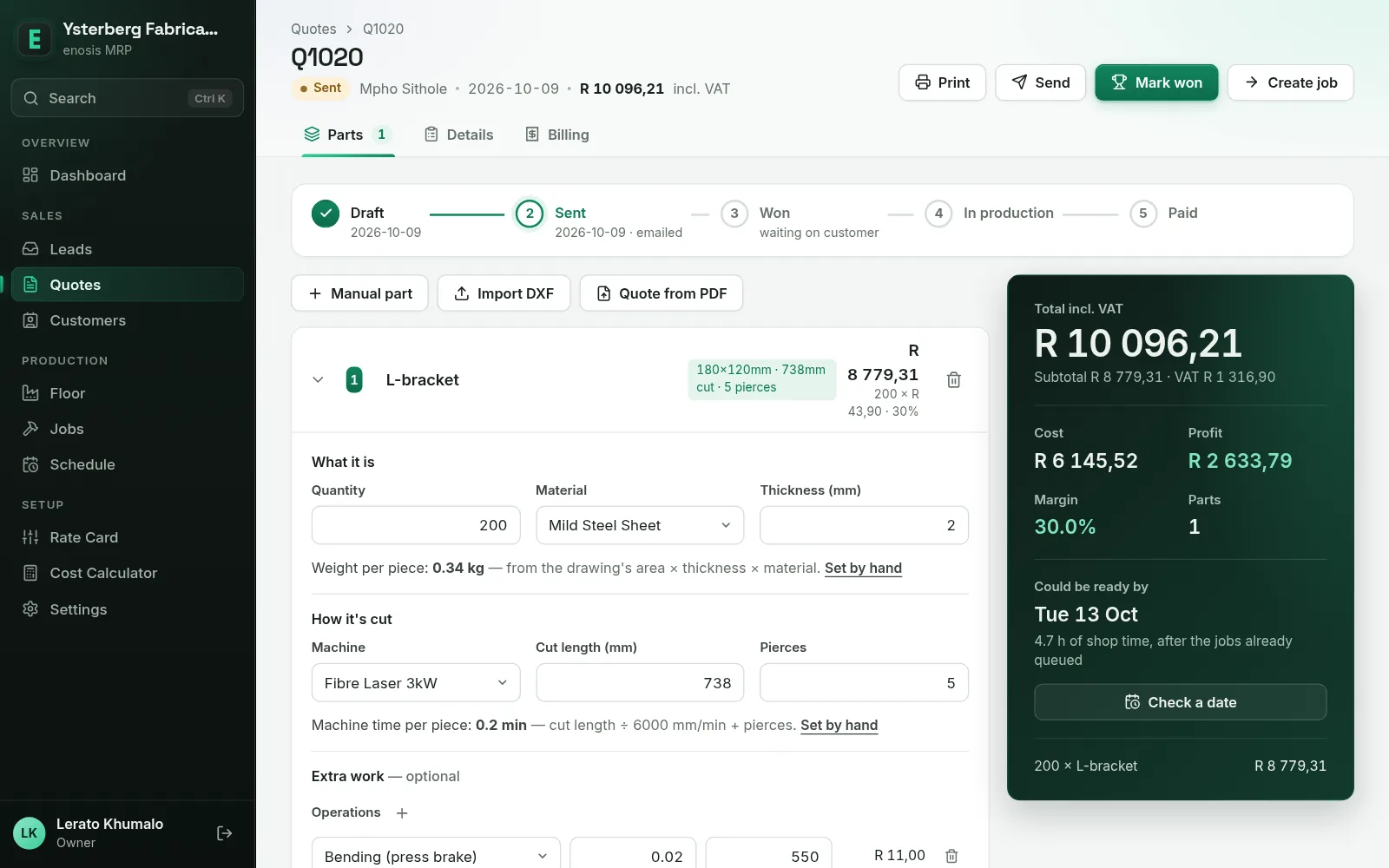
The quote editor: an L-bracket imported from a DXF file, costed from material, cutting time and bending, with the total, cost, profit, margin and a possible ready date.

Accepted and paid online

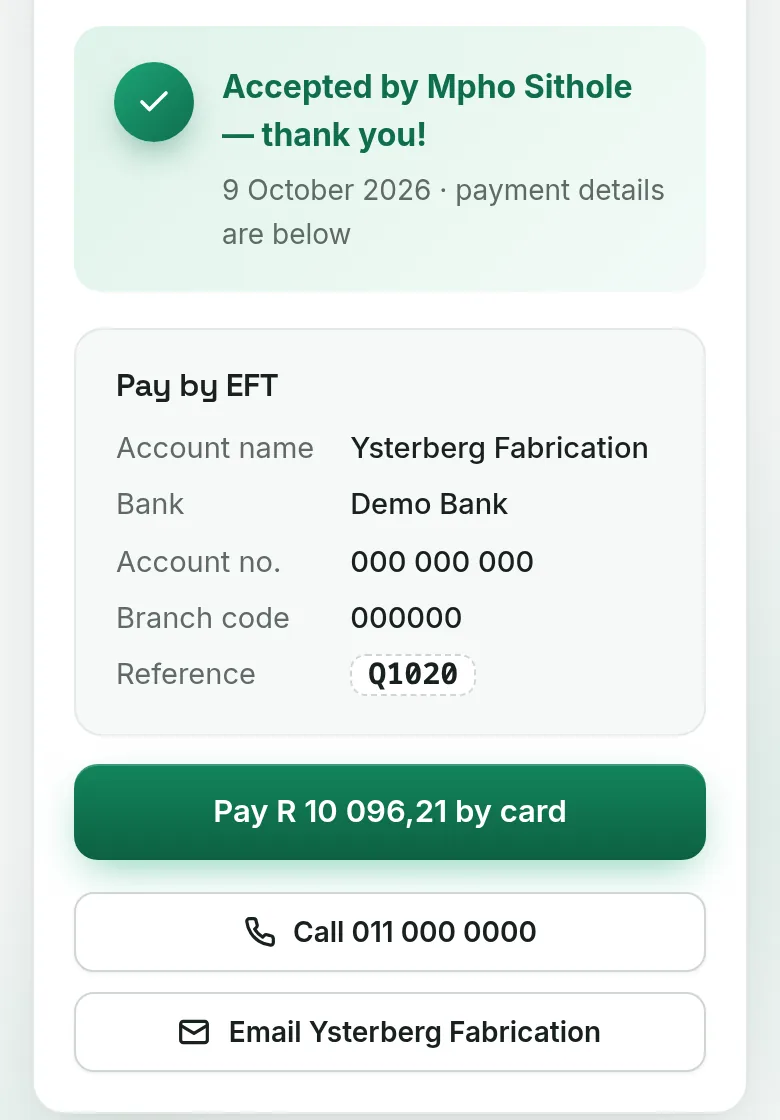
Email the quote as a PDF in your own branding, with a link. Your customer opens it on any device, accepts it online and gets your EFT details with the quote number as reference — or pays by card through Paystack.

  • Your logo and colours on quotes, job cards and customer pages
  • Quotes that go quiet are flagged for a follow-up; expired ones can’t be accepted
  • An accepted quote becomes a job by itself
The customer’s quote page on a phone: quote accepted, EFT details with the quote number as reference, and a pay-by-card button.

A shop floor that reports itself

Every part follows its route — cut, bend, weld, coat. Operators log good pieces, scrap with a reason and time at each step, so a job’s status is what actually happened on the floor.

  • Job cards and barcoded part labels; scan them with a barcode scanner or a tablet’s camera
  • Raise an issue from the machine; a critical one stops the job until it’s resolved
  • Time used against time quoted, per step and per job
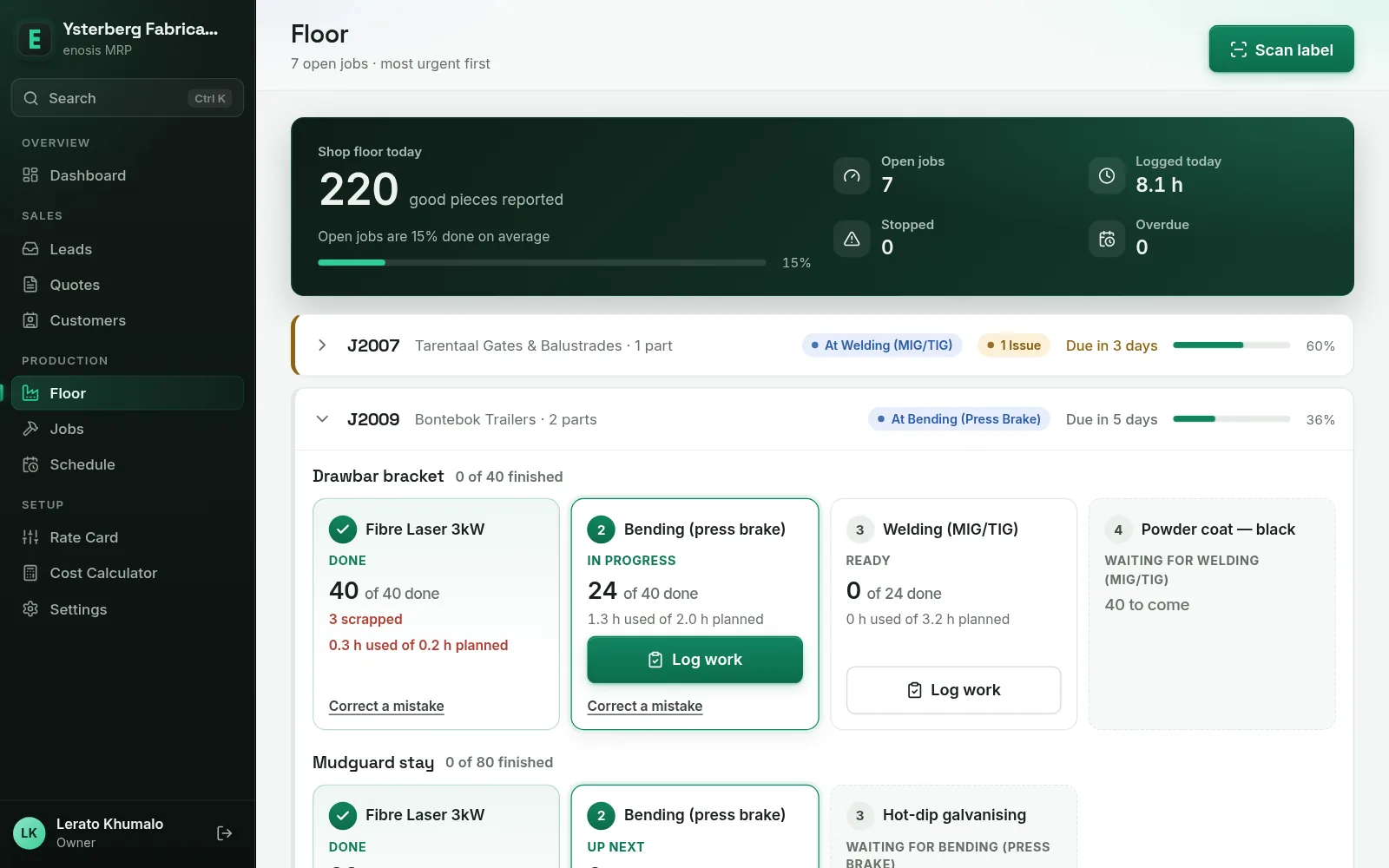
The floor screen: a job’s route as step cards — laser cutting done with 3 scrapped, bending in progress at 24 of 40, welding ready, powder coat waiting.

Know if you can fit it in

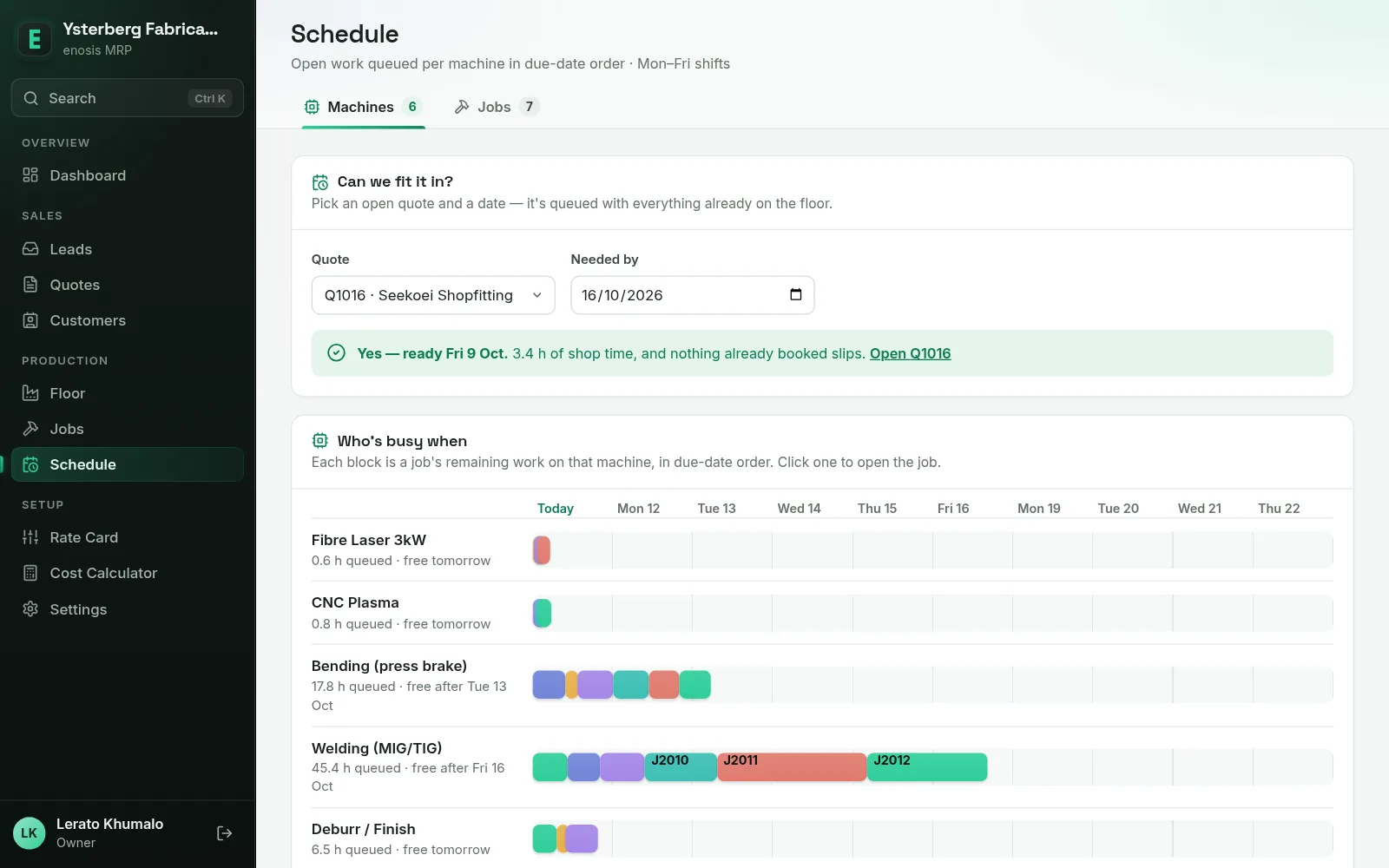
Open work is queued per machine in due-date order across Monday-to-Friday shifts. Pick a quote and a date to see whether it fits — and which jobs would slip if it does.

  • A projected finish date for every open job
  • Jobs heading for late flagged before the due date
The schedule: a “Can we fit it in?” check answering yes for an open quote, above a two-week timeline of queued work per machine.

Also in the box

  • Lead inbox

    Enquiries to your sales mailbox become leads, and the sender gets an automatic reply.

  • Dashboard

    Margin on won work, win rate, quoted vs won, and what needs attention today.

  • Roles

    Owner, Estimator and Storeman each see what their job needs.

  • Xero & QuickBooks

    Send an accepted quote across as an invoice, or export a CSV.

  • Your branding

    Your logo and brand colour on everything your customers see.

  • Runs in the browser

    On office PCs and on tablets at the machines. Nothing to install.

See it in action: the product tour →

From enquiry to invoice in six steps

  1. Enquiry

    Emails to your sales inbox become leads, and the customer gets an automatic reply. Phone calls and walk-ins are logged by hand.

  2. Costed quote

    Import the DXF or let AI read the PDF drawing. Every line is costed from your rate card, with the margin in view.

  3. Accept & pay online

    The customer opens the quote from a link, accepts it online and pays by EFT or card.

  4. Job & schedule

    The accepted quote becomes a job, queued per machine in due-date order — so you know when it will be ready.

  5. Shop floor

    Print job cards and barcoded labels. Scan at the machine, log work step by step, and raise issues the office sees straight away.

  6. Invoice

    Send the accepted quote to Xero as a draft invoice, or to QuickBooks, in one click.

Walk through every step on real screens

An enquiry lands in your inbox

Point Enosis MRP at your sales mailbox. Every new email becomes a lead — attachments kept — and the sender gets an automatic reply. Phone calls, walk-ins and WhatsApps are logged by hand, so nothing lives only in someone’s head.

Cost the quote from the drawing

One click turns the lead into a quote. Import the DXF and the cut length, pierces and size are read off the drawing; add the quantity, material and thickness, and the part is costed from your rate card — material, machine time, bending, coating — with cost, profit, margin and a likely ready date alongside. Got a PDF drawing instead? “Quote from PDF” uses AI to read the parts list, and you confirm each material.

Your rates, your numbers

The rate card starts with South African benchmarks for machines, materials and operations — edit them to match your shop. Not sure what to charge per machine hour? The cost calculator works it out from the machine’s price, power, labour and overheads.

Send it the way your customer likes

Email the quote with the PDF attached and a link to view it online, or share the link on WhatsApp. The PDF carries your logo, company details and banking details.

Accepted and paid from a phone

Your customer opens the link on their phone, sees the quote in your branding and accepts it online. Straight after, they get your EFT details with the quote number as reference — or pay by card through Paystack.

The job is created for you

An accepted quote becomes a job with the quoted parts and their routes, a due date and notes for the floor. The quote keeps track of where it is: draft, sent, won, in production, paid.

Print a job card with sign-off boxes for each stage, and a barcode label for every part. The labels carry standard barcodes, so any barcode scanner can read them.

Work the floor step by step

Each part shows its route as step cards: done, in progress, ready, or waiting for an earlier step. Scan a label to jump to the part, then log the good pieces, any scrap with a reason, and the time it took.

The floor’s own view

Floor staff sign in with the Storeman role, on a tablet at the machines. When something’s wrong — material short, a machine down, a drawing query — they raise an issue and the office sees it straight away. A critical issue stops the job until it’s resolved.

Plan the week

Remaining work is queued per machine in due-date order across Monday-to-Friday shifts. Ask “can we fit it in?” for any open quote and date before you promise, and see when every job should finish.

Invoice it

Connect Xero or QuickBooks under Settings, and an accepted quote goes across as an invoice in one click — a draft invoice in Xero. You can also download the PDF or a Xero import CSV, and mark EFT payments as paid when they land.

With Xero or QuickBooks connected, a “Send invoice” button appears beside “Mark paid”.

The owner’s view

The dashboard shows the margin on won work, the open pipeline, win rate and quoted vs won over six months — and what needs attention today: floor issues, jobs due soon, quotes that need chasing.

Made for job shops that make to order

If you cut, bend, machine, weld or coat parts to a customer’s drawing, Enosis MRP is built around your day — and priced in Rand, with 15% VAT and EFT built in.

The work

  • Laser, plasma and waterjet cutting
  • Sheet-metal bending and fabrication
  • CNC milling and turning
  • Welding and assembly
  • Powder coating and finishing — in-house or sent out

The people

Owner
The whole shop, including the money and the setup
Estimator
Leads, quotes, customers and rates
Storeman
The floor: jobs, labels, scanning and logging work

Questions shops ask

Something else? Ask it in the demo request.

Can I use Enosis MRP today?

Enosis MRP is in early access — we’re piloting it with our first shops now. Request a demo and we’ll show you the system and talk about getting your shop onto it.

What does it cost?

We aren’t publishing prices during early access. Tell us about your shop in the demo request and we’ll talk it through.

Do I need to install anything?

No. Enosis MRP runs in the browser — on office PCs and on tablets at the machines. Your customers open their quotes from a link; they don’t need an account.

Can it read my drawings?

Import a DXF and the cut length, pierce count and part size are read for you. A PDF drawing can be read by AI to pull out the parts list; the materials are a best guess, so you confirm each one.

How do my customers pay?

Once they accept a quote online, they see your bank details with the quote number as the reference for an EFT. Add your Paystack keys and they can pay by card as well.

Does it work with my accounting system?

An accepted quote can be sent to Xero as a draft invoice, or to QuickBooks, in one click. There are PDF and CSV exports too, including a Xero import file.

Does it do stock and purchasing?

Not yet. Today Enosis MRP covers enquiries, quoting, jobs, the shop floor, scheduling and invoicing. Purchasing and stock control are planned.

Who makes it?

Enosis, a South African software company — more about Enosis. You deal directly with the people who build it.
See Enosis MRP on your own jobs

Enosis MRP is in early access — we’re piloting it with our first shops. Tell us what you make and how you quote today, and we’ll show you the MRP on work like yours. We reply within one business day.